Forms for deeper student feedback and voice messages in assignment chats

Newsletter Archive
logo
logo
banner
banner
caleb
caleb

Caleb Smith

Product Marketer


“Today, we’re excited to share updates that help you streamline your interactions with students and keep you on the same page. With survey forms, you can gain more in-depth insights into your audience’s needs and priorities. Assignment chats with text and voice messages allow you to clarify requirements faster, enhancing your student learning experience.

See all the details in this email.”

Survey forms in your online courses

Survey forms in your online courses

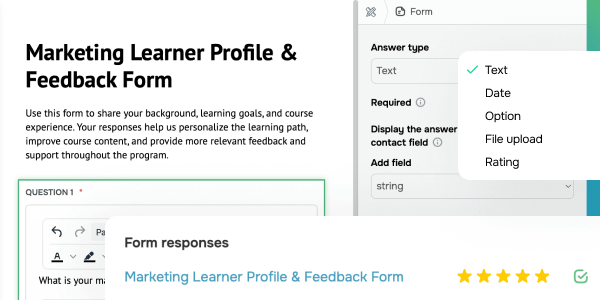
Collect meaningful feedback throughout the course so you can fine-tune your program and offer personalized guidance based on your students’ actual needs. Simply add the “Form” element to your course, craft your questions, and select the response type, including the following:

  • Text: “What result do you want to achieve in 30 days?” “Describe your request to your instructor.”
  • Option: “What kind of support would be most helpful?” (case review / learning roadmap / career strategy / technical audit)
  • Date: “When would you like to start the next section?” “Choose a convenient date for your session.”
  • File upload: “Upload materials for review (brief, presentation, draft).” “Share a sample of your current project for tailored feedback.”
  • Rating: “Rate your current level of expertise in this topic.” How confident do you feel applying this knowledge in practice?”

All form responses are stored in the “Analytics” section → “Forms” tab and in your student cards. You can also sync text and date fields with the CRM contact record. This will help you segment your audience more accurately and allow your instructors to tailor follow-ups based on individual answers.

You can also restrict a form to higher-tier plans to gain in-depth insights into paying students and provide a more premium learning experience.

For instance, if analytics shows that PRO students are looking for industry case studies, you can introduce a dedicated lesson for this tier or offer a personalized strategy session.

Add form
Smarter student answer reviews and assignment chats

Smarter student answer reviews and assignment chats

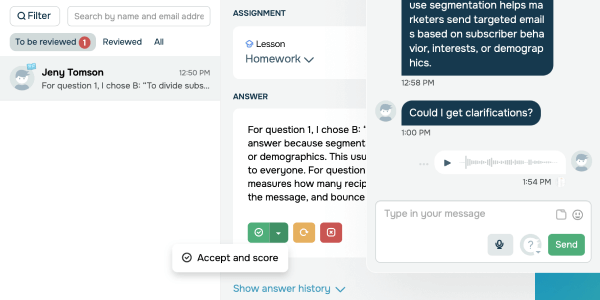
Managing assignments is now faster and more intuitive. In the “Assignment answers” section, you can instantly see answers waiting for review and use advanced filters and search to locate specific student work right away. Every assignment shows your student’s answer history along with the latest version ready for your approval. Based on your review, you can:

  • accept and score student assignments;

  • discard student progress;

  • return assignments for revision.

More than that, we introduce new assignment chats supporting text and voice messages so you can help students deliver stronger results. With these chats, instructors can clarify mistakes and provide guidance faster, and students can ask questions immediately, enhancing their performance.

You can make this feature a premium perk in higher-tier plans. For instance, enable assignment chats for all paid plans, and offer voice messaging with instructors exclusively on the VIP plan.

Review assignment answers
icon
icon

If you need help with setup or have any other questions, contact our tech support team — we're in touch 24/7.

Best regards, Caleb Smith
sendpulse.com

You received this email because you are a customer of SendPulse.

Unsubscribe

Sent via

SendPulse