New “Comment on your post” trigger in your chatbots

Newsletter Archive
logo
logo
banner
banner
caleb
caleb

Caleb Smith

Product Marketer


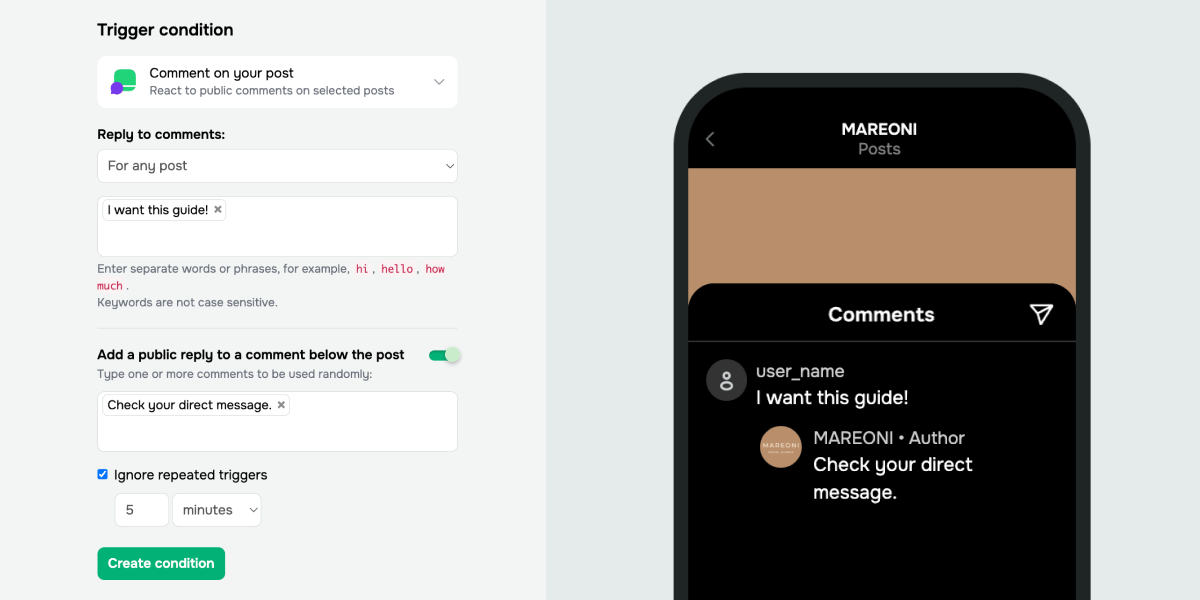
On Instagram and Facebook, you can now launch chatbot flows using the “Comment on your post” trigger. Once a subscriber comments with the keyword on any of your posts, your chatbot instantly DMs them the tailored information.

600-300_1bf3bece
600-300_1bf3bece

Here’s how it works:

  • A user drops a comment with the “price” keyword → your chatbot DMs them a price list or product card and invites them to place an order.
  • A user comments with the “appointment” or “booking” keywords → your bot DMs them available time slots and requests contact details to lock in an appointment.

This will enable your chatbot to initiate conversations exactly when they matter most and help convert subscribers into leads and loyal customers.

Follow our self-help guides to learn how to set up the “Comment on your post” trigger for your Instagram and Facebook chatbots.

Create a trigger

With a paid plan, you can specify which posts will trigger your chatbot flows. This lets your chatbot deliver replies tailored to each post’s topic, enhancing customer experience and driving more conversions.

Here’s how it works:

  • A user comments with “guide” or “catalog” on your post containing a lead magnet → your chatbot DMs a PDF file and requests their contact details.
  • A user comments with “promo code,” “details,” or “how to apply” on your “20% off until weekend” post → your bot delivers the promo code and encourages them to use it right away.
Upgrade your plan
icon
icon

If you need help with setup or have any other questions, contact our tech support team — we're in touch 24/7.

Best regards, Caleb Smith
sendpulse.com

You received this email because you are a customer of SendPulse.

Unsubscribe

Sent via

SendPulse