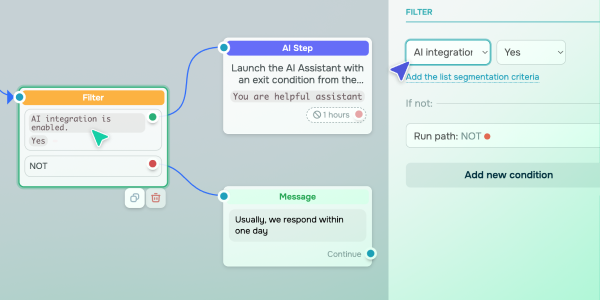
Upgraded OpenAI integration settings You can now adjust AI settings, such as prompts, models, and context length, right in the “AI Step” element when creating chatbot flows. To help your chatbot determine whether it can proceed with an AI-generated response, we’ve added a new "AI integration is enabled" filter condition. It will allow you to verify the following: - whether an OpenAI token has been added to the "AI Step" element;
- whether a subscriber has reached their AI request limit.
Your chatbot uses received data to guide subscribers through various flow branches automatically. For instance: - If AI integration is enabled, your chatbot will generate a personalized response using your selected GPT model.
- If AI is unavailable, your chatbot will switch to another branch with predefined responses. It can show FAQs or offer to contact your assigned team member.
Either way, your chatbot will deliver a smooth user experience and ensure no conversation goes unanswered. Learn more about how to add a new filter condition in our knowledge base. |