New advanced features in our chatbot builder

Newsletter Archive
SendPulse
New features in our chatbot builder
Caleb Smith

Caleb Smith

Product Marketer


“Our SendPulse team has made your chatbots even smarter! You can now create automated repetitions of your chatbot flow elements, add card carousels to your live chat messages, utilize an enhanced “Conversations” tab, and personalize your automated flow pause settings. Read on to learn all the details!

New “Repeat” element for your chatbot flows

New “Repeat” element for your chatbot flows

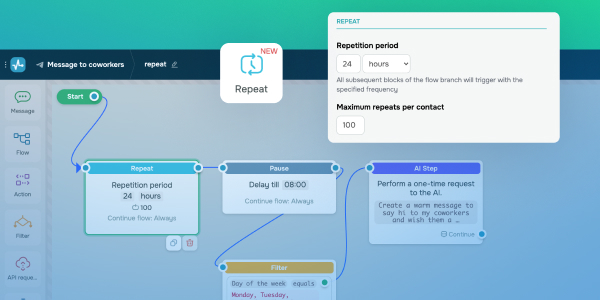
Our chatbot builder now includes a new "Repeat" element that allows you to set up automated action repetitions in your chatbot flows.

You can use it to do the following:

  • Set up payment reminders — send your customers messages to remind them to pay for their orders.
  • Notify about subscription status updates — automatically notify users when their current subscription period has expired and suggest renewal.
  • Boost engagement — engage inactive users with chatbot reminders.
  • Keep your customers updated — automatically deliver subscribers summaries and reports based on your website data or generated by AI.

How do I set up the “Repeat” element in my chatbot flow?

  1. Select your chatbot flow.
  2. Add the “Repeat” element before an element you want to repeat.
  3. Set up your repetition period between 15 minutes and 60 days.
  4. Specify the number of repetitions — no more than 100 times for one contact.
  5. Click “Apply.” 

Now you're all set!

Set up repetition
Cards and card carousels for live chats

Cards and card carousels for live chats

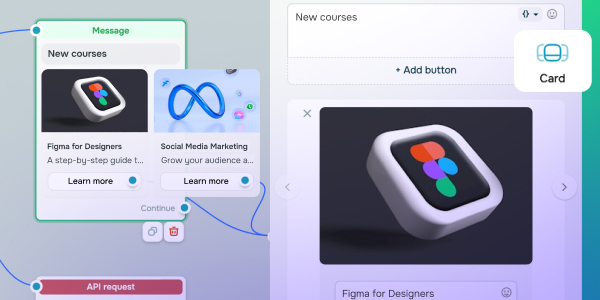
You can now add separate cards or use the “Carousel element to add multiple cards to your live chat messages.

Your cards can include the following:

  • Titles;
  • Images;
  • Descriptions;
  • Up to 3 buttons.

You can also send cards with dynamic content from third-party servers. To do this, add the "API request" element to your chatbot flow. Learn more in our knowledge base.

If you already have ready-made cards or card carousels in your messaging app chatbots, you can copy them to your live chat to launch them effortlessly.

Try it out
Improved “Conversations” tab

Improved “Conversations” tab

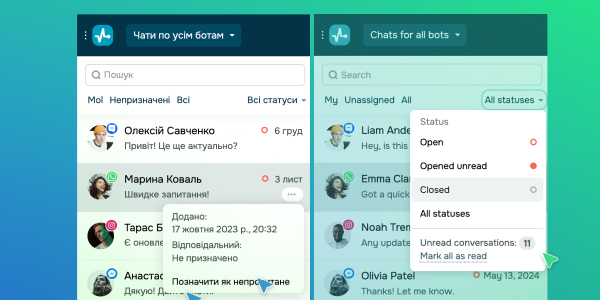
Manage your conversations with customers seamlessly! You can now manually mark chatbot conversations as read or unread. Plus, any unanswered messages will automatically be highlighted in bold so that you can see them and respond immediately.

Also, if you start texting a user but switch to another chat, your message will remain saved until you send or delete it.

Try it out

New automated flow pause settings

Previously, your automated flows were paused by default for one hour after you manually responded to your chatbot subscribers. Now you can adjust this pause duration from ten minutes to twenty-four hours. You can also disable it so your bot can continue conversations without delay.

How do I customize my pause settings?

  1. Select your chatbot in your SendPulse account.
  2. Click “Bot settings” → “General” tab.
  3. Select your pause duration or disable it.
  4. Click "Apply."

These settings are also applicable to your Instagram and Facebook chatbots and messages sent using the API request.

Set up a pause
icon

If you need help with setup or have any other questions, contact our tech support team — we're in touch 24/7.

Best regards, Caleb Smith

sendpulse.com

You received this email because you are a customer of SendPulse

Unsubscribe

Sent via

SendPulse