Convert your email flows to Automation 360

Newsletter Archive
SendPulse

We are closing access to the sequential automation feature and will convert any existing flows to Automation 360

On July 1, 2020, we are shutting down our Sequential Automation feature. You will not be able to send or edit automated email flows that were previously set up using this feature. However, you can still view statistics for these campaigns.

What happens with the old automation flows that I still want to send?

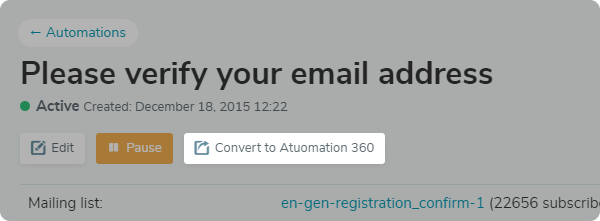
Convert old email flows to our new system for trigger emails Automation 360. To convert them, simply click the "Convert to Automation 360" button.

pic-convert-to360-en

All of the preferences you configured for the sequential flows are saved while converting your old email flows: the triggers and settings, as well as specific UTM codes in your emails. For example, if you set up an old flow to send an email two days after a trigger is met — Automation 360 will keep your settings and also send the email two days after the trigger.

Convert flows

What happens after converting your email flows?

Existing email flows will be sent to subscribers that are already in the sending queue for any old email flows. New subscribers will receive campaigns from the updated Automation 360 flow.

Check your email automations and convert any that you want to continue using in Automation 360.


Still have questions?

Ask our technical support

footer_top_line

Have a great day!

sendpulse.com 

footer_bot_line12


You received this email because you are a customer of SendPulse. 
You can leave this mailing list.

Sent via

SendPulse